The photo booth for your parties, in Polaroids to share.

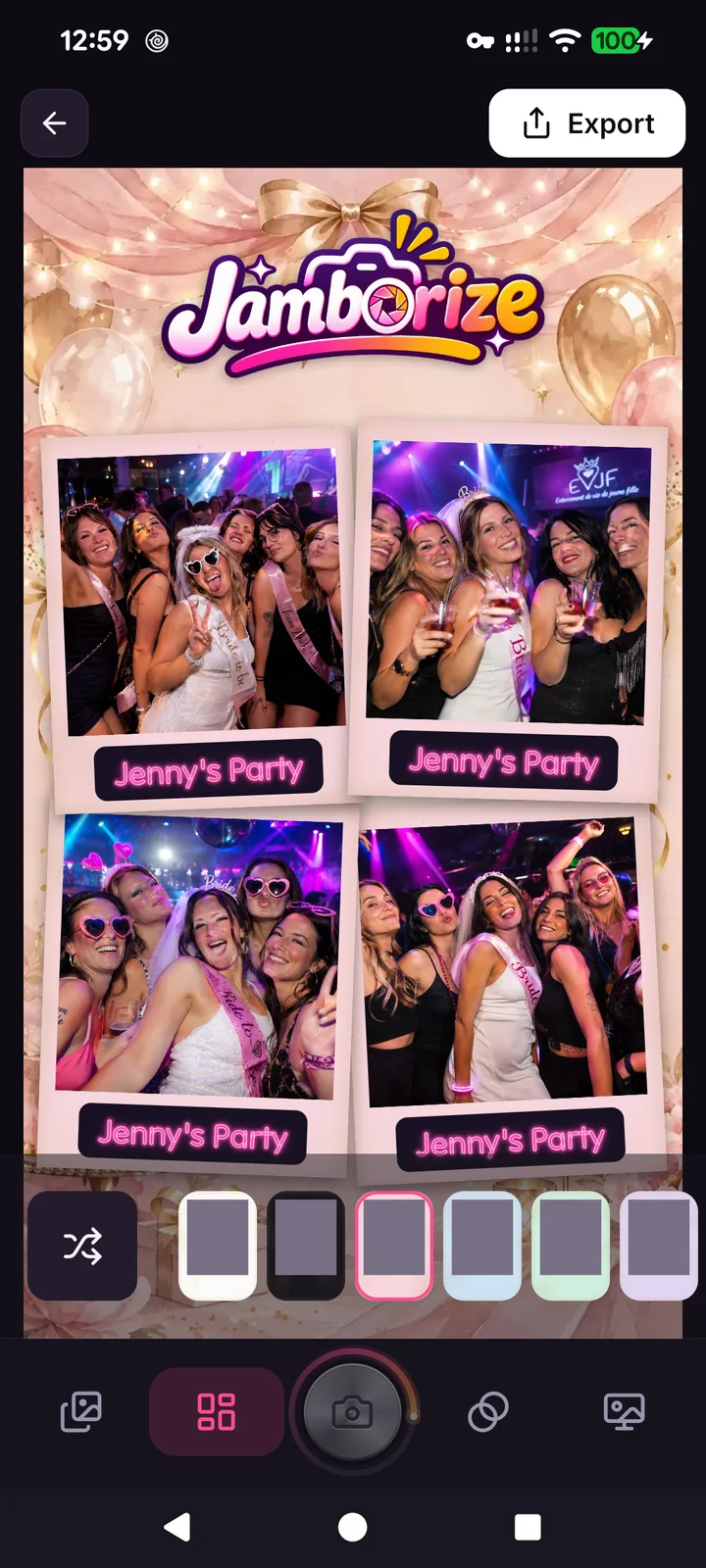
Four square photos, four real Polaroids on an illustrated background: Jamborize turns your phone or your computer into a photo booth for your parties, birthdays and weddings. Your keepsake is ready to share, to e-mail to your guests, to print or to post as a 10-second video story.

On Mac and on Windows via the Microsoft Store now, on Android in December 2026
Coming soon toGoogle Play Watch the video
  • No account
  • No ads
  • No subscription, lifetime license
Jamborize Studio: a “Jenny’s Party” Jambo and the frame color picker
10 s storyready to post
E-mail sendingstraight to your guests
JamboBooth3, 2, 1… smile!

Jamborize for desktop, available now.

Turn a Windows PC or a Mac into a photo booth for your parties, weddings and events: guests see themselves on a second screen, pick up their Jambo with a QR code and leave with their photo print. On Windows, Jamborize is downloaded directly from the Microsoft Store.

  • 4 × 6 or A4 photo printing
  • Second screen for guests
  • Jambo pickup by QR code
  • Video slideshow of the event

Free 7-day trial

Windows 10 and 11 (64-bit) via the Microsoft Store macOS 12 or newer

Installation information

Jamborize installs in a few minutes: on Mac with the file downloaded from this site, on Windows directly from the Microsoft Store.

Intel or Apple Silicon Mac?

Macs use two families of processors. Each installer is optimised for one of them: choose the one that matches your Mac.

  • Apple SiliconMacs with an Apple M1, M2, M3, M4 or newer chip, which covers most Macs sold since late 2020.
  • IntelOlder Macs with an Intel processor.

To check: Apple menu › About This Mac. A “Chip” line (Apple M…) means an Apple Silicon Mac, a “Processor” line (Intel…) means an Intel Mac.

If you pick the wrong one: the Intel version also runs on an Apple Silicon Mac, but more slowly; the Apple Silicon version does not open on an Intel Mac.

Installing on Mac

  1. Open the downloaded .dmg file: a window opens with Jamborize and the Applications folder.
  2. Drag the Jamborize icon onto the Applications folder, then eject the “Jamborize” disk in the Finder.
  3. Jamborize does not come from the App Store: the first time you open it, macOS asks you to allow an app downloaded from the Internet. Right-click (or Control-click) Jamborize, choose Open, then confirm with Open.
  4. If macOS only offers Done or Move to Bin (macOS 15 Sequoia and newer), choose Done, open System Settings › Privacy & Security, scroll down to the message about Jamborize and click Open Anyway. Confirm with your password.

You only need to allow it once.

Installing on Windows from the Microsoft Store

The Windows version is downloaded directly from the Microsoft Store: there is no installer to download from this site.

  1. Click the Microsoft Store button: the Jamborize page opens on the Microsoft Store.
  2. Click Get (or Install). If your browser asks, allow it to open the Microsoft Store app: Jamborize downloads and installs automatically.
  3. Launch Jamborize from the Start menu. No security warning: the app is verified and distributed by Microsoft.
  4. Updates install automatically through the Microsoft Store.

The free 7-day trial and the license work just as on Mac: the license is bought on this site.

A party keepsake ready in seconds.

  1. 1

    Take 4 photos

    The square viewfinder opens right in the app: two taps per photo. Or set down the phone, tablet or computer and let the JamboBooth photo booth shoot every 3 or 5 seconds.

  2. 2

    Jamborize lays them out

    Your photos become four slightly tilted Polaroids on one of 50 illustrated backgrounds: birthday, wedding, Christmas, Halloween, company party, sports…

  3. 3

    Share or print

    Save your Jambo in HD, share it in one tap, e-mail it, print it in 4 × 6 or A4 from the computer or create a 10-second video for your stories.

Set the phone down, the party does the rest.

With the JamboBooth event mode, your party photo booth: guests line up, each one starts a session, strikes a pose, gets their Jambo by e-mail… and the next guest steps right in.

  • Background, frame, text and logo chosen once for the whole evening
  • Direct e-mail sending, even offline: e-mails go out as soon as the network is back
  • Giant edge-to-edge capture window
JamboBooth session in progress: countdown before the first of four photos

Friends gathered in a living room decorated with garlands, glasses raised, during a photo booth party

A whole photobooth in your pocket.

Made for birthdays, weddings, nights out with friends, family celebrations and company events: a photo booth that is simple for everyone, polished down to the details.

JamboBooth, the party photo booth

4 photos, one shot every 3 or 5 seconds, a visual and audible countdown, then the Jambo appears with its sharing options. Once the action is done, the next session is ready: perfect for a queue of guests.

Fingertip editing

Reframe each photo, move and tilt the prints, choose which ones sit on top.

50 backgrounds and artistic filters

Birthday, wedding, Christmas, Halloween, beach, football, rugby, tennis… or your own picture as a background. Plus film, retro, comic, pop art and distortion filters to give your photos some style.

Real Polaroids

The original square format, white or black frames with a gently aged charm, or your own picture in the frame.

Video for stories

The prints land one by one and develop like real instant photos, in 9:16, ready for Instagram, TikTok or WhatsApp.

Text, logo and date

12 lettering styles, one text repeated on every photo of the evening, your logo at the top of the Jambo and the orange date of film compact cameras.

Direct e-mail sending

With your own mail server, each guest receives their Jambo at their address. Without network, e-mails wait and go out by themselves.

In 6 languages

French, English, Spanish, German, Italian and Portuguese, picked automatically from the phone or computer.

Your photos stay with you

No account, no ads, no trackers. Your photos stay on your phone or computer.
Ready for the next party?

Download Jamborize on your computer, soon on your phone, and create your first Jambo in seconds.

Jamborize for Mac & PC

Your photo booth, on the big screen and on paper

The Jamborize app on your computer: the same Studio and JamboBooth as on Android, with your webcam, your own printer and a configurable second screen.

  • 7-day free trial, every feature included
  • Direct printing in 10 × 15 cm (borderless) or A4, with printer selection in the app
  • Configurable secondary monitor to display live photo capture on the big screen
  • Webcam, photo import, mouse or touch screen
  • Lifetime licences, no subscription

Single licence

Desktop version

€59.00

one-time payment · lifetime licence

  • 1 code · 1 computer
  • Windows · macOS Intel or Apple Silicon

3-licence pack

Desktop version

€119.00

−33%vs. 3 single licences

one-time payment · lifetime licence

  • 3 separate codes · 3 computers
  • Windows · macOS Intel or Apple Silicon

Secure payment by Stripe · codes sent by email

Let’s work together

Tell us about your partnership idea for Jamborize. We will reply by email.

This information is only used to review your enquiry and respond to you.